Product Overview
CacheMesh is a high-performance parallel file system developed by CKCloud for modern data-intensive workloads, delivering strong speed, scalability, and reliability across AI, machine learning, image processing, autonomous driving, EDA, scientific computing, and rendering scenarios.
Through innovations in metadata management and storage engine architecture, CacheMesh delivers TB/s-level throughput, tens of millions of IOPS, and consistent sub-millisecond latency. It integrates technologies such as SPDK and RDMA, supports high-speed IB and RoCE networks, and provides POSIX, NFS, and SMB access for performance-critical enterprise environments.
Product Advantages
High Performance
CacheMesh uses a proprietary POSIX-compatible client and an intelligent data routing engine based on efficient consistent hashing to shorten I/O paths and maximize storage efficiency.
- Up to TB/s-level throughput
- Up to tens of millions of IOPS
- Consistent sub-millisecond latency
High Availability
Multiple storage nodes form a distributed cluster for load balancing and continuous service availability.
Multi-replica protection, balanced data distribution, and automatic failure recovery improve durability and service continuity.
Metadata uses multi-node and multi-replica redundancy, allowing each metadata node to process requests independently and reducing hotspots.
Elastic Scalability
CacheMesh supports seamless online expansion without interrupting running applications. Capacity can be expanded dynamically as business requirements grow.
A single file system currently supports up to 10 PiB.
Shared Access
Multiple hosts in the same project can mount and access a shared file system simultaneously, making it well suited for collaborative workloads and distributed computing.
There is no restriction on the number of compute nodes that can access a file system.
Ease of Use
CacheMesh can be provisioned, expanded, and managed directly through the CKCloud Console.
With full POSIX compatibility, existing applications can integrate without code changes, and standard file system tools can be used directly.
Use Cases
CacheMesh is designed for data-intensive workloads that require shared high-performance storage, large-scale scalability, and concurrent access across multiple compute nodes.
Large Language Model Training
- High-concurrency data access
- Fast checkpoint storage and retrieval
- Low-latency dataset streaming
- Shared storage for GPU clusters
Autonomous Driving
- Large-scale sensor data processing
- High-speed data ingestion and transmission
- Simulation and model training workloads
- Distributed data management
Rendering and Visual Computing
- Simultaneous access to large media assets
- Support for hundreds or thousands of rendering nodes
- High-bandwidth file access
- Accelerated production pipelines
Electronic Design Automation
- Efficient processing of massive volumes of small files
- High-performance simulation workloads
- Time-series analysis and verification tasks
- Scalable storage for chip design environments
Product Overview
ClawRouter is a unified access gateway for LLMs and OpenClaw services built on the X402 payment network. It combines authentication, billing, and service invocation into one interface, enabling real-time pay-per-use access without prepaid balances or manual account management.
By abstracting payment handling, authorization, and provider-specific integrations, ClawRouter lets developers and AI agents access AI services through a consistent API experience.
Key Features
X402-Native Payment Gateway
Enable real-time service payments through the X402 network without wallet top-ups, credit allocation, or manual balance management.
Unified LLM Access
Access mainstream LLM providers through a single API endpoint while abstracting differences in authentication, billing, and provider-specific implementations.
OpenClaw Integration
Expose OpenClaw capabilities through the same gateway so applications can consume both LLM and OpenClaw services with a consistent interface.
Agent-Optimized Architecture
Designed for autonomous and multi-agent systems, supporting automated service invocation, payment settlement, renewals, and task orchestration with minimal operational overhead.
Typical Use Cases
ClawRouter is well suited for applications that require automated access to AI services, including:
- Multi-agent systems
- Autonomous task execution frameworks
- AI copilots and assistants
- Workflow automation platforms
- Batch inference pipelines
- Agent-to-agent service coordination
It is especially valuable in environments where usage settlement must be completed through the X402 payment network, reducing integration complexity and operational overhead.
API Endpoints
CKCloud provides X402 paywall-based authentication and payment settlement for LLM access.
Management APIs
Used for account management, payment queries, and operational functions.
Endpoint pattern: /v1/*
Model Inference API
Used for invoking LLM services protected by the X402 paywall.
Endpoint: /x402/v1/chat/completions
Request Flow
1. Invoke a Protected Endpoint
The client sends a request to an X402-protected LLM endpoint.
2. Payment Verification
The ClawRouter backend validates the attached payment signature and available balance. If valid and sufficient, the request is forwarded upstream; otherwise it returns a payment requirement response.
3. Complete Payment
The client signs and submits the required payment through the X402 network.
4. Retry Request
After payment is completed, the client resubmits the request and receives the model response.
Benefits
User Manual
Overview
CKCloud provides x402 paywall-based authentication for LLM access. Main endpoints:
- Management and query APIs:
/v1/* - Model invocation endpoint:
/x402/v1/chat/completions
Core Flow
- The client calls an x402-protected LLM endpoint.
- If a valid payment signature is included and balance is sufficient, the backend validates and forwards to the upstream model API.
- If payment is missing or balance is insufficient, the backend returns a paywall/payment requirement.
- The client completes payment signing and retries the request.
OpenClaw Installation and Usage
Install
Run on the machine where OpenClaw will be installed:
curl -fsSL https://pkg.ckcloudai.com/update.sh | bashAfter installation, a wallet address is generated or reused from cache:
- Solana wallet:
HjrbgMg*********************************2mqYha5 - Base wallet:
0x64eb7a0**********************0cc322F6
Start / Restart
openclaw gateway restartTop Up
Transfer funds to the generated wallet address, then you can use OpenClaw directly.
Check Status and Wallet
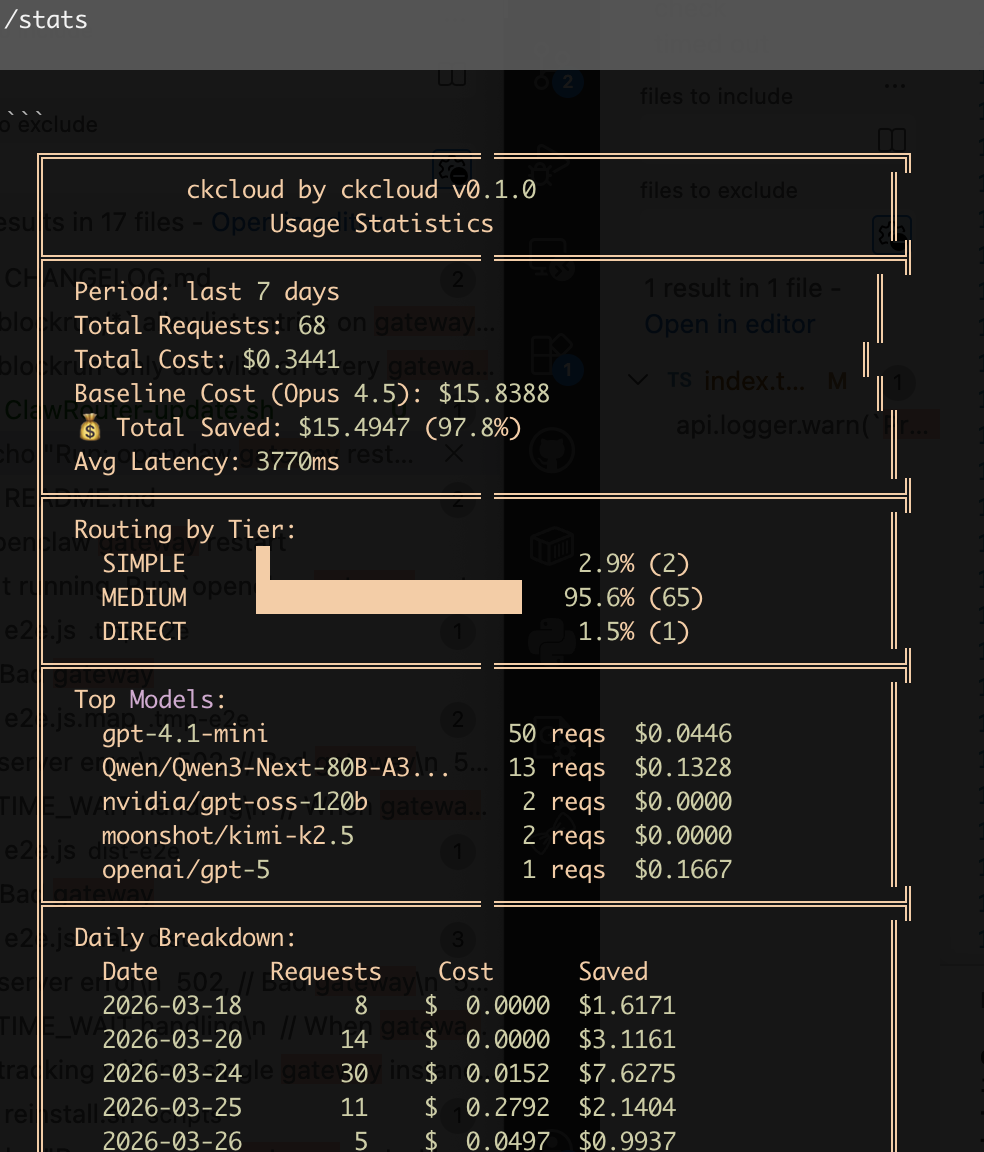
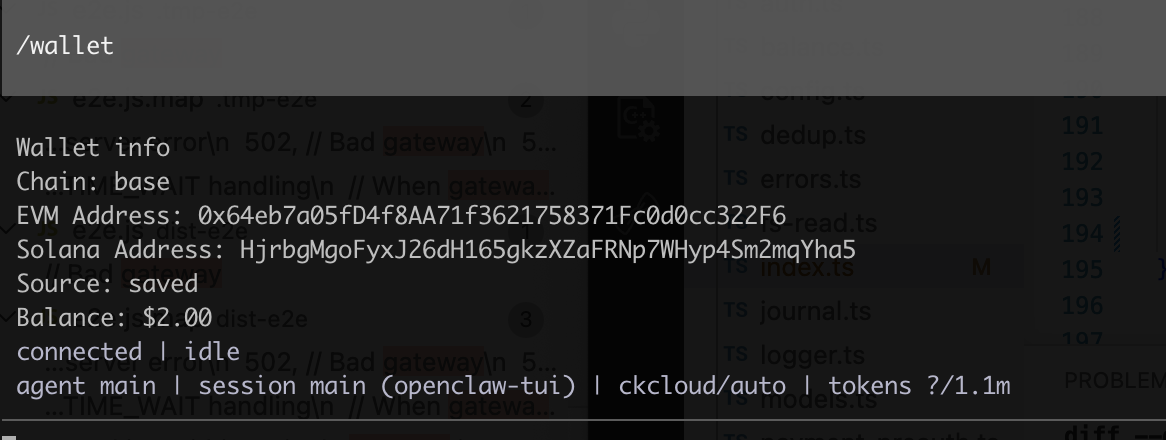
/stats
/wallet/stats to avoid OpenClaw auto-rewriting it to /status./stats - Usage Statistics
/wallet - Wallet Info
Uninstall and Reinstall
Uninstall:
bash ~/.openclaw/extensions/ckcloud/scripts/uninstall.shReinstall:
curl -fsSL https://pkg.ckcloudai.com/reinstall.sh | bashx402 Authentication and Payment Flow
Endpoint: POST /x402/v1/chat/completions
Request Requirements
Headers:
Content-Type: application/jsonPAYMENT-SIGNATURE(optional): Base64-encoded x402PaymentPayload
Body (OpenAI-compatible):
{
  "model": "google/gemma-3n-E4B-it",
  "messages": [
    {"role": "user", "content": "Hello"}
  ]
}
Server Behavior
With PAYMENT-SIGNATURE
- Decode and parse payload
- Verify signature (EVM EIP-712 / Solana ed25519 supported)
- Get or create user and check balance
- Forward to upstream model API if balance is sufficient
Without PAYMENT-SIGNATURE
Return paywall/payment requirement directly.
Key Response Headers
PAYMENT-REQUIREDPAYMENT-RESPONSE
Clients should use these headers to complete payment and retry.
Recommended Request Flow
Step 1: First request (without signature)
curl "http://localhost:8080/x402/v1/chat/completions" \
  -H "Content-Type: application/json" \
-d '{"model":"google/gemma-3n-E4B-it","messages":[{"role":"user","content":"Hello"}]}'PAYMENT-REQUIRED.Step 2: Retry with signature after payment
curl "http://localhost:8080/x402/v1/chat/completions" \
  -H "Content-Type: application/json" \
  -H "PAYMENT-SIGNATURE: <base64-payment-payload>" \
-d '{"model":"google/gemma-3n-E4B-it","messages":[{"role":"user","content":"Hello"}]}'API Reference
Base URL depends on deployment: http://<host>:<port>. Responses are generally application/json.
Get Balance
/v1/balance| Parameter | Required | Description |
|---|---|---|
Pubkey | Required | Your public key |
curl -G "http://localhost:8080/v1/balance" \
  --data-urlencode "Pubkey=YourPublicKey"
{"balance": 12.345678}Get Consumption History
/v1/consume-history| Parameter | Required | Description |
|---|---|---|
Pubkey | Required | Your public key |
Model | Optional | Filter by model |
Page / Limit / Offset | Optional | Pagination |
Start / End | Optional | Time range (ISO 8601) |
curl -G "http://localhost:8080/v1/consume-history" \
  --data-urlencode "Pubkey=YourPublicKey" \
  --data-urlencode "Page=1" \
  --data-urlencode "Limit=20"
Get Payment History
/v1/payment-history| Parameter | Required | Description |
|---|---|---|
Pubkey | Required | Your public key |
Chain | Optional | e.g. eip155:1 |
Page / Limit / Offset | Optional | Pagination |
curl -G "http://localhost:8080/v1/payment-history" \
  --data-urlencode "Pubkey=YourPublicKey" \
  --data-urlencode "Chain=eip155:1"
Get Available Models
/modelscurl "http://localhost:8080/models"// Response fields: model, displayName, provider, modelType,
// contextLength, inputPrice, outputPrice, supportFunctionModel Call with x402 Auth
/x402/v1/chat/completionscurl "http://localhost:8080/x402/v1/chat/completions" \
-H "Content-Type: application/json" \
-H "PAYMENT-SIGNATURE: <base64-payment-payload>" \
-d '{"model":"google/gemma-3n-E4B-it","messages":[{"role":"user","content":"Hello"}]}'Error Codes and Troubleshooting
Common x402 Errors
X402 PAYMENT-SIGNATURE decoded error
Signature header is not valid Base64
X402 PAYMENT-SIGNATURE unmarshal error
Decoded payload is not valid JSON structure
X402 PAYMENT-SIGNATURE verify error
Signature verification failed (chain type/signature/address mismatch)
X402 PAYMENT user get or create error
User retrieval/creation failed
X402 Settlement Response pay error
Settlement process failed
Common /v1 Errors
user pubkey not found
Check whether Pubkey is provided
get user error
Backend user query failed
get consume history error
get total consume count error
get payment history error
get total payment count error
Troubleshooting Checklist
- Call
/v1/modelsto confirm model availability. - Call
/v1/balanceto verify account balance. - If
/x402/...returns paywall, verify client-side handling ofPAYMENT-REQUIRED. - If signature request still fails, verify Base64 validity, chain type, and wallet/signature match.
- Use
/v1/consume-historyand/v1/payment-historyfor detailed records.